You can enable the AI extension under Extensions/Licenses by checking the “Enable” box next to the name of the extension.
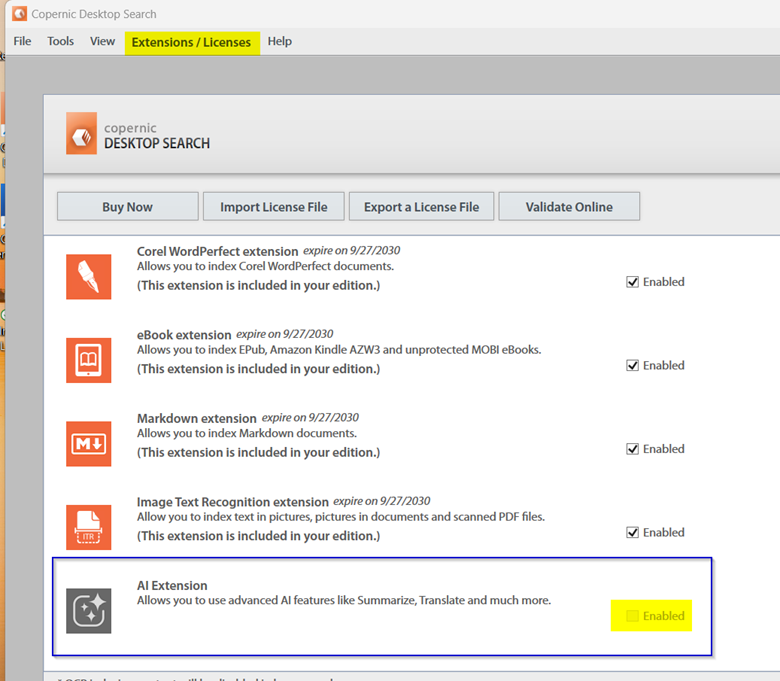
Once it’s enabled, you can head over to your AI settings in Tools->Options->AI to create your preferred settings.
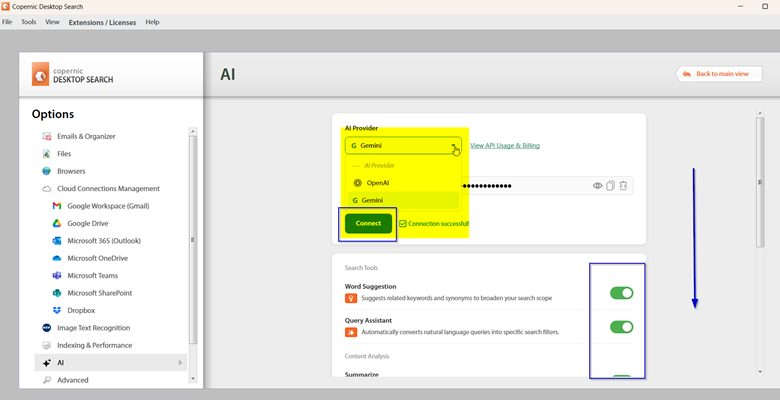
Select your preferred AI Provider and input your API key. It is important to understand that you are responsible for any fees associated with your AI usage. Toggle your desired features off or on. Select “Return to Main Menu” to save your changes and return to the main dashboard.
Your dashboard will look like this once the set-up is complete:

Was this article helpful?
That’s Great!
Thank you for your feedback
Sorry! We couldn't be helpful
Thank you for your feedback
Feedback sent
We appreciate your effort and will try to fix the article